

Time tracking is only one part of productivity. Vineforce Teams combines accurate time tracking with task and project visibility, helping teams stay aligned, understand progress, and manage work efficiently. Everything lives in one platform, giving leaders clarity without complexity. while giving leaders clear and actionable insights from a single platform.
Better than Worktime
Vineforce Teams is a smarter alternative to WorkTime Tracker, built for teams that want real productivity, not just activity tracking. It combines time tracking with tasks and project management, giving teams clear visibility into progress and outcomes. Teams can stay organized, prioritize work, and manage projects efficiently, while leaders get meaningful insights into daily work.
Start Your Free Trial
Enjoy a 07-day free trial with no credit card required.
By creating an account, you accept our Terms and Privacy Policy.







The All-in-One Advantage
Why settle for a tool that only watches you work when you can have one that helps you finish it
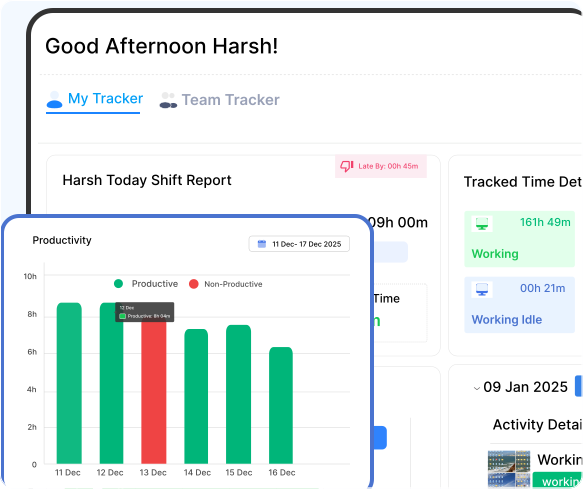
Where Tracking Supports Real Work
The Traditional Way
Most tracking tools are great at watching screens, but they often miss the bigger picture of how work actually gets done.
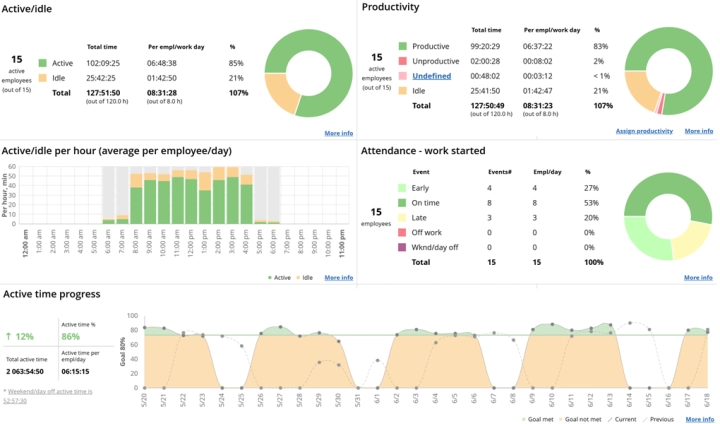
Tracking Activity, Not Achievement
Tools like WorkTime Tracker primarily focus on activity tracking and basic productivity measurement. They provide visibility into app and website usage and logged hours, which can be useful for surface-level monitoring. However, with limited project management and task-level integration, it can be difficult to connect time spent with real progress or completed outcomes. This approach delivers activity data but offers less support for planning, prioritizing, and driving work forward.
What is the Main Difference
Most tools just watch your team. Vineforce helps them win. See how we compare to the traditional tracking way.

Vineforce Teams is built for teams that want full visibility into work not just activity data.
- Tracks time with tasks, projects, and real work progress.
- Provides deep website & app insights that explain productivity.
- Smart attendance, break tracking, and idle time analysis.
- Live screen monitoring and automated screenshots.
- Role-based access for admins, managers, and team leads.
- Focuses on improving productivity and accountability.
- Built for growing teams and performance-driven companies.

WorkTime primarily focuses on activity tracking with basic productivity metrics.
- Records time only, without task or project context.
- Tracks website & app usage with basic productivity scores.
- Basic attendance and idle time data.
- Does not emphasize live screen monitoring or automated screenshots.
- Limited role-based access controls.
- Focuses only on surface-level monitoring.
- Best suited for simple tracking needs.
What Makes Vineforce Teams Better
While many tools focus only on monitoring activity, Vineforce Teams is built to help teams manage work improve productivity and stay organized every day not just analyze behavior.

Accurate Work Insights
Track project progress in real time, monitor task-level time, and see individual contributions.

Automatically Sync
As soon as an internet connection is restored, all the captured data is automatically upload to dashboard.

Zero Click Mode
Zero-Click Mode automatically tracks your work in the background no need to start or stop the tracker manually.
Frequently Asked Questions
What is the difference between Vineforce Teams and WorkTime Tracker?
Vineforce Teams combines time tracking with task and project management, giving teams visibility into real progress, while WorkTime Tracker primarily focuses on logging hours and basic activity.
Can Vineforce Teams help improve productivity?
Yes. Vineforce Teams not only tracks time but also helps teams organize work, prioritize tasks, and understand outcomes, offering meaningful insights for managers.
Which tool is better for teams looking to improve performance?
Vineforce Teams is better suited for performance-driven teams, while WorkTime Tracker is mostly for surface-level activity tracking.
Can Vineforce Teams replace multiple productivity tools?
Yes Vineforce Teams combines time tracking productivity insights attendance tracking and team management in one platform. This reduces the need for multiple tools and gives managers and teams a single place to track work manage schedules and review performance.
Is Vineforce Teams suitable for remote and hybrid teams?
Absolutely Vineforce Teams works well for remote hybrid and in office teams. It helps managers stay connected with team progress while giving employees the flexibility to work from anywhere with clear expectations and structured tracking.
Ready to streamline your entire workflow?
Vineforce Teams makes it simple to monitor employee productivity with automated time tracking, smart idle detection, and detailed reporting. Build the perfect system to manage projects, ensure accountability, and get insights into your team’s workflow, all in one place.
