

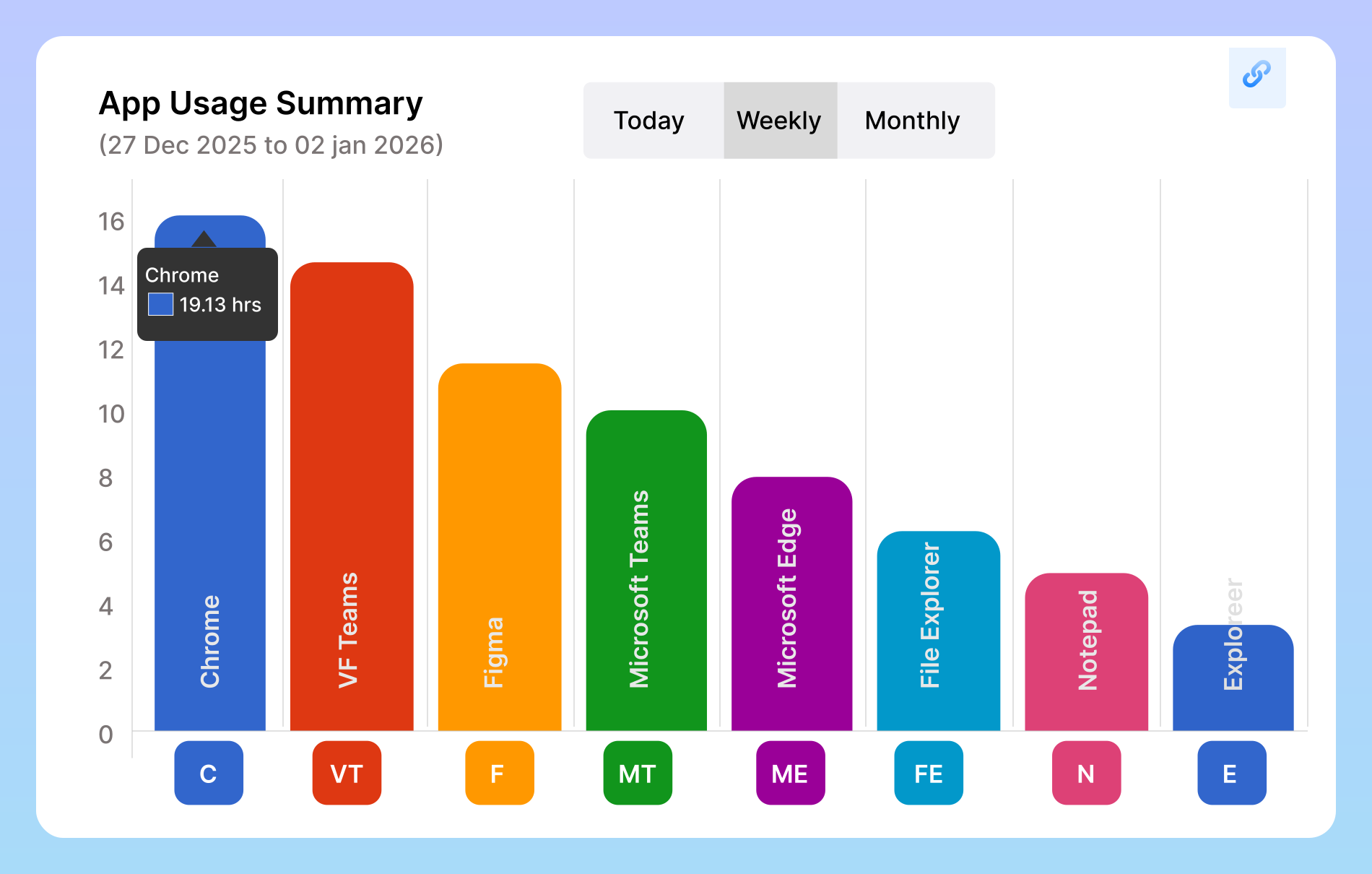
Vineforce Teams automatically logs all activities, tracking exactly how much time is spent on each app or website down to the second. Check your dashboard to get a clear overview of team productivity, see which tasks take the most time, and make data-driven decisions to improve efficiency. It allows managers to measure and analyze team productivity by assigning a productivity status to each website and application. Every app or website your team accesses during work hours can be marked as productive, neutral, or unproductive.
App & URL Tracking
See the full picture of how work gets done. Our App & URL tracking gives you clear, respectful insights into the tools and websites your team uses every day. It’s not about watching over shoulders; it’s about creating a more efficient, focused, and supportive work environment for everyone.
Start Your Free Trial
Enjoy a 07-day free trial with no credit card required.
By creating an account, you accept our Terms and Privacy Policy.







Why App URL Tracking Matters
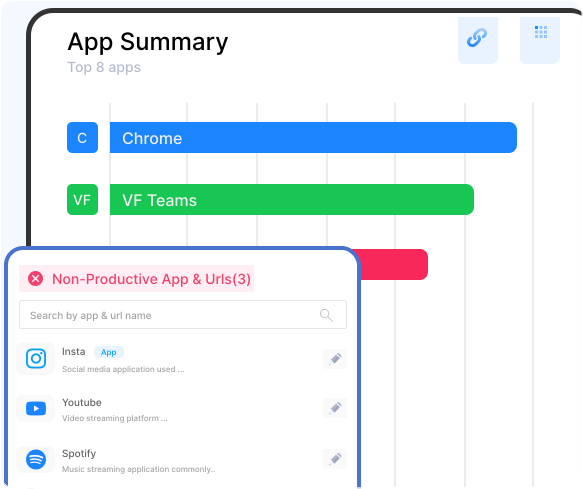
Vineforce Teams automatically monitors the websites and applications your team uses during work hours. It tracks which apps are actively used and which websites are visited, helping managers understand how time is spent.
Activity Logging & Insights
App & URL Productivity
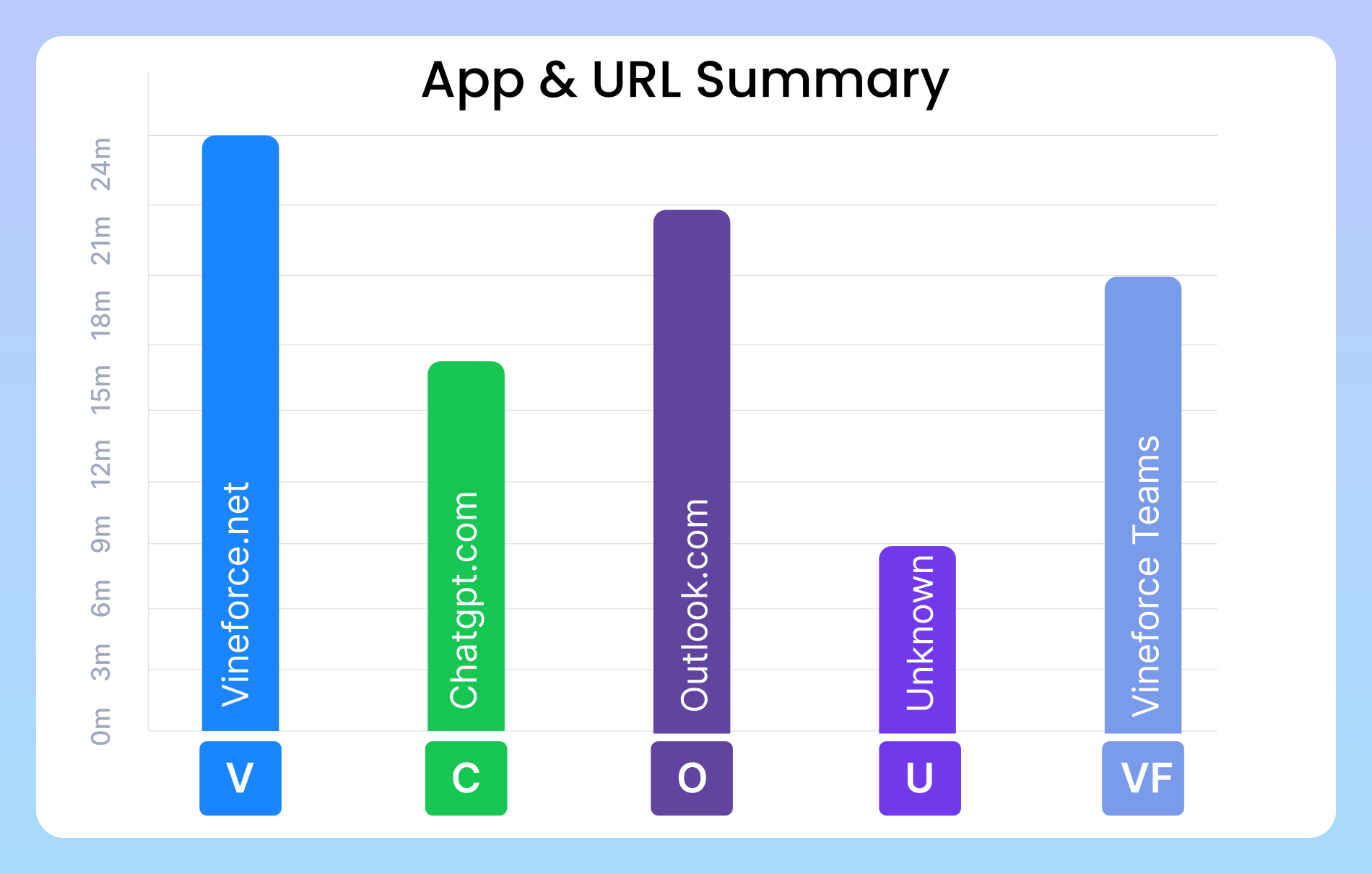
Understand exactly how your team spends digital time with detailed App & URL tracking. Get a clear, in-depth breakdown of applications and websites used, helping you identify productivity patterns.
Performance Evaluation with URL & App
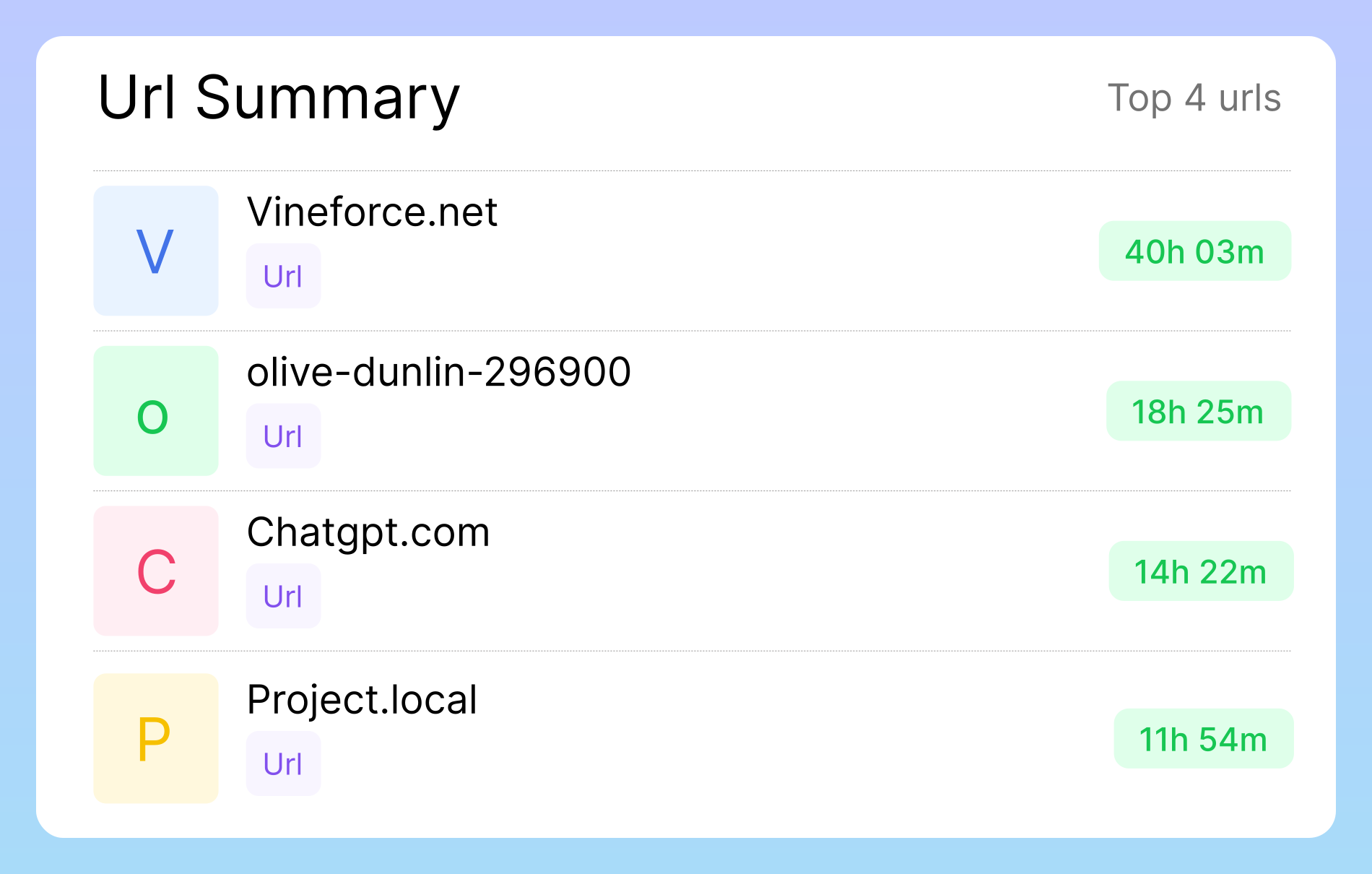
To monitor the websites and apps your team uses, each member needs to install the desktop app. From the dashboard, you can see exactly how much time was spent on each app or URL, tracked down to the second. The dashboard shows exactly how much time was spent on each app or URL. Set productivity status for each website to analyze overall team productivity . Track daily app and website usage to identify work patterns.
Enhance Team Efficiency
Understand exactly how digital time is spent across your team. App & URL tracking gives you a clear breakdown of which tools fuel productivity and which ones slow it down. With these insights, managers can fine-tune processes, eliminate distractions, and guide teams toward focused work. Get visibility into the apps and sites used during work hours. Optimize workflows and allocate resources more efficiently. Reduce wasted time and improve overall team productivity.
Forget Worries with Website & App Tracking
Vineforce Teams automatically tracks which websites and applications employees are using, helping you stay confident about productivity without constant supervision.

Eliminate Unproductive Time
Even well-meaning employees can accidentally waste hours on non-work activities like watching YouTube, scrolling social media, or browsing entertainment websites. Vineforce Teams tracks which applications and websites are being used, giving insights into unproductive habits.

Transparent Remote Teams
Managing remote teams can be challenging because you can’t physically see what employees are working on. Vineforce Teams removes this uncertainty by providing visibility into their work through automatic screenshots and app/website tracking.

Catch Slackers Early
One of the biggest challenges in team management is employees who appear busy but aren’t actually productive. With Vineforce Teams’ screenshot and activity monitoring, these “slackers” are easier to identify. Automatic tracking of their activity on tasks, websites.
Frequently Asked Questions
How do I set up URL & App Tracking for my team in Vineforce Teams?
Focus on simplicity. Explain that it involves a lightweight agent/app that team members install on their work computers. Mention that administrators can manage settings from a central dashboard.
What exactly does Vineforce Teams track?
Be specific and transparent. List the data points: the URL of the active website, the name of the application being used, and the duration of use. Crucially, also state what you don’t track (e.g., “We do not record keystrokes, screen content, or access personal files”).
Will the tracking agent slow down my team's computers?
Reassure the user. Explain that the agent is lightweight and designed to have a negligible impact on system performance, running silently in the background.
How can I categorize websites and apps as 'Productive' or 'Unproductive'?
Explain the feature that allows managers to create custom categories. This shows the flexibility of the tool and how it can be adapted to different team roles (e.g., social media is ‘unproductive’ for an accountant but ‘productive’ for a social media manager).
Is the data collected secure, and who has access to it?
All data is encrypted and stored securely. Access to idle time reports is restricted to authorized managers and administrators within your organization. The data is used solely for your internal productivity and workflow analysis and is never shared with or sold to third parties.
Ready to streamline your entire workflow?
Vineforce Teams makes it simple to monitor employee productivity with automated time tracking, smart idle detection, and detailed reporting. Build the perfect system to manage projects, ensure accountability, and get insights into your team’s workflow, all in one place.
